Evolution to Autonomy: Why I Rewrote AIPIM for v2.0.0
Since the inception of AIPIM, my goal has been to bridge the gap between human developers and AI coding assistants. I wanted a structured, reproducible, and context-rich way to manage AI-assisted software development. Version 1.3.0 was the pinnacle of that initial vision: a robust system relying on Markdown files as the source of truth, a clipboard-based prompt workflow, and deep integration with tools like Cursor.
But as AI agents like Claude Code evolved, the old model began to show its limits. Humans shouldn't be the API layer between an LLM and the file system.
Today, I'm thrilled to announce AIPIM v2.0.0 - a complete architectural rewrite that transitions AIPIM from a semi-manual prompt generator to a fully autonomous, event-sourced, native Model Context Protocol (MCP) ecosystem.
Here's a deep dive into the technical differences, the reasons behind this massive shift, the advantages it brings, and how you can leverage it today.
AIPIM now is more powered:
$ aipim uiAIPIM MCP server running at http://localhost:3141/mcpREST API available at http://localhost:3141/api/tasksUI available at http://localhost:3141/ui/Add to Claude Code: claude mcp add aipim http://localhost:3141/mcpWhy Change the v1.x Architecture?
The v1.3.0 Paradigm
In AIPIM 1.x, the state of the project lived entirely in .md files residing in the .project/ directory (backlog/, in-progress/, completed/). The workflow relied heavily on CLI commands like aipim start, aipim resume, and aipim pause.
- The Flow: The human would run a command. The CLI would read the markdown files, package the context into a massive text prompt, and copy it to the operating system's clipboard. The human would then paste it into an AI chat interface.
- The Flaws:
- Concurrency: If multiple team members (or multiple AI branches) updated the Markdown backlog files simultaneously, Git merge conflicts were inevitable and painful to resolve.
- Friction: Humans acted as massive, slow API conduits, constantly switching windows to copy and paste context.
- State integrity: Parsing Markdown to extract structured data (like task statuses or blockers) was inherently fragile.
I've realized that as LLMs transitioned from "chat bots" to "autonomous agents", our tooling needed to support programmatic, structured interactions.
The Architecture of Event-Sourced & MCP-Native
To solve these bottlenecks, I threw away the clipboard and the fragile Markdown parsing. AIPIM 2.0.0 is built on three core technical pillars:
Event Sourcing
The source of truth is no longer a collection of Markdown files. It is now a single, append-only JSON Lines file (events.jsonl).
- Every action (creating a task, updating a status, adding a comment, logging a decision) is recorded as an immutable event.
- Why this is revolutionary from 1.x: By moving to an append-only log, I've eliminated Git merge conflicts. AIPIM v2 automatically configures your Git repository with a
union mergedriver (.gitattributes). If two developers complete different tasks at the exact same time, Git simply appends both JSON lines. No conflicts, zero data loss.
SQLite Derived State
While an append-only log is great for writing, it's terrible for querying. To solve this, AIPIM 2.0 uses a local SQLite database to project the event log into queryable tables (Tasks, Comments, Decisions).
- This state is entirely ephemeral and derived. You can rebuild the entire database from scratch by replaying the
events.jsonlfile in milliseconds. This guarantees perfect consistency while providing ultra-fast read operations.
Native MCP Server
The Model Context Protocol (MCP) allows AI tools to securely read from and write to your local environments. In v2.0.0, AIPIM spins up a local Hono HTTP server that acts as an MCP server.
- No more copy-pasting: Tools like Claude Code connect directly to the AIPIM MCP server via port 3141.
- The LLM can independently call Read Tools (
list_tasks,get_next_task,get_project_context) to understand what needs to be done. - Once the work is done, the LLM calls Write Tools (
complete_task,log_decision) to update the project state autonomously. The AI drives the project management system itself.
The Svelte 5 Real-Time UI
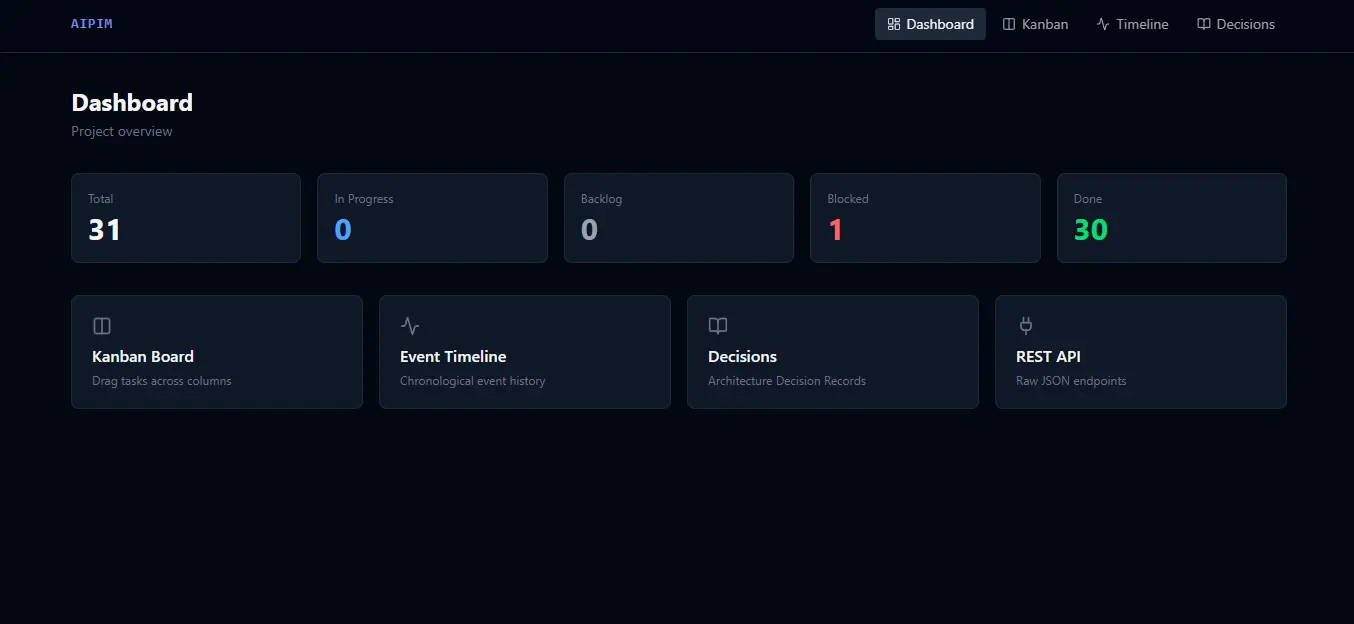
Because AI agents are now doing the heavy lifting in the background, human developers need a better way to visualize what the AI is doing.
AIPIM 2.0 ships with a lightning-fast, beautiful UI built on Svelte 5 (Runes), Vite 6, and Tailwind CSS v4.
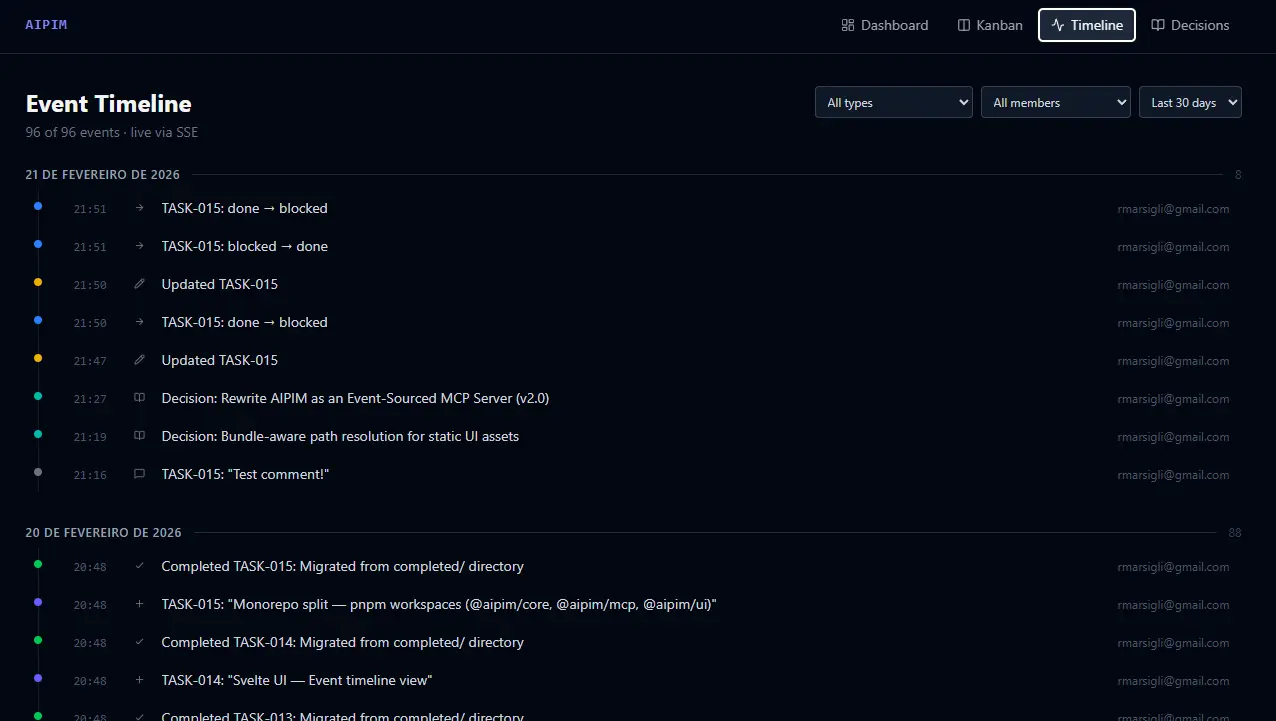
- Real-time Everything: The UI connects to the AIPIM backend via Server-Sent Events (SSE). When an AI agent completes a task via the MCP server, your Kanban board and dashboard update instantly, without a page reload.
- Rich Features: It includes a dashboard, an interactive HTML5 drag-and-drop Kanban board, a chronological event timeline, and Markdown-rendered task detail views with inline editing and comment threads.
- Incredibly Lightweight: The entire application bundle weighs under 40 KB gzipped.
How to Use AIPIM 2.0?
Globally install with npm install -g aipim and - in the root of any project, use aipim install.
Migration is Painless
If you have an existing v1.x project, I've built a robust migrator. Simply run your CLI update command to get the new version, then navigate to your project root and run:
aipim migrateThis intelligently parses all your old backlog/*.md and completed/*.md files and synthesizes them into the new events.jsonl format.
The New Workflow
- Define Your Team Identity: Run
aipim team addto setup yourconfig.toml. Every event is now attributed to an actor (resolved automatically via Git or environment variables). It's great to know who (human or AI) completed a task. - Start the MCP Server: In your terminal, run:
This boot sequence automatically manages the SQLite rebuild and exposes the MCP interface on port 3141.
Terminal window aipim mcp start - Connect Your Agent: Point your MCP-compatible client (like Claude Code) to the server.
- Boot the UI: Open a new terminal tab and type:
Keep this open on a second monitor. Watch your AI agents pick up tasks, move them across the Kanban board, and log architectural decisions in real-time.
Terminal window aipim ui
The True "Junior Dev" Mindset Realized
In v1.3.0, you were managing the AI. In v2.0.0, the AI manages itself via MCP constraints, while you oversee the process via the UI. Now, you can stop manually updating task statuses. Ask your AI assistant to evaluate the get_next_task tool, write the code, and use the complete_task tool. Your job shifts completely from copy-pasting context to reviewing PRs and monitoring the Svelte Kanban board.
The Next Era of AIPIM
AIPIM v2.0.0 isn't just an update: it's a paradigm shift. By embracing Event Sourcing and the Model Context Protocol, I have removed the friction between AI intent and project state. I can't wait to see what you and your AI agents will build with the new AIPIM.
Update today, run aipim migrate or try it with npm install -g aipim && aipim install, and step into the future of autonomous software development.